Email Innovation Hub
One platform to build, test and ship email campaigns, made for agencies that work across many clients and many martech platforms.
Built and running today.
One platform to build, test and ship email campaigns, made for agencies that work across many clients and many martech platforms.
Built and running today.
Every campaign runs through a separate editor, preview service, QA checker, ESP dashboard and approval thread.
Each campaign solves the same rendering and fallback problems again by hand. One round of changes can take days.
A fix found on one client is invisible on the next. It lives in someone’s head rather than in the system.
For an agency serving many brands on different platforms, the cost of this grows with every new client.
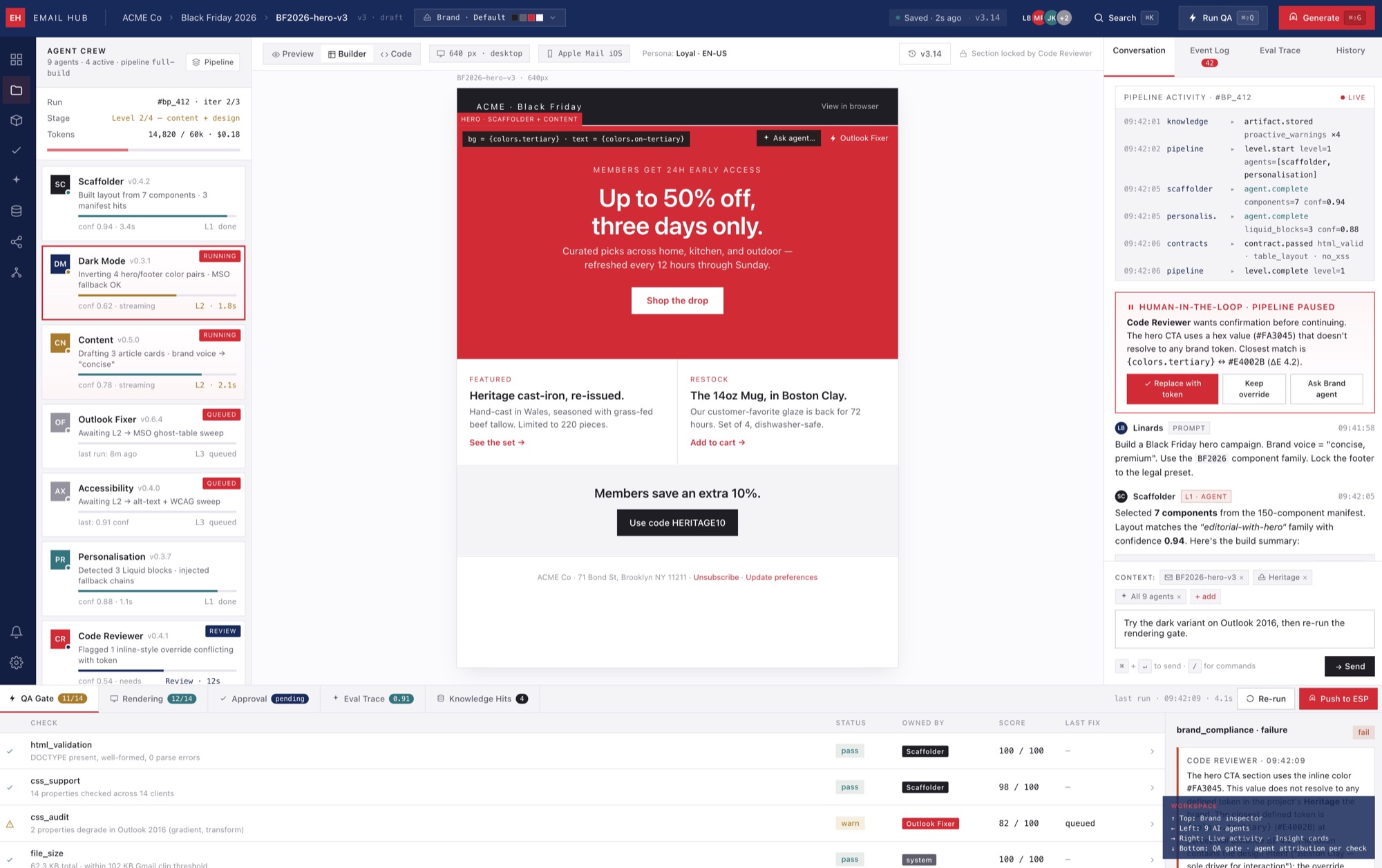
From brief to inbox: write, preview, test, approve and export without leaving the platform.
Every stage above works today.
| Without the Hub | With the Hub |
|---|---|
| Templates assembled by hand for every campaign | Assembled from tested, versioned, reusable components |
| Dark mode fixed per template, per client | Dark mode handled once, in the design system |
| Manual cross-client QA, client by client | Automated rendering checks in a single pass |
| AI used ad hoc, with no quality control | AI output that has to pass review gates |
| Knowledge trapped in developers’ heads | Knowledge indexed, searchable and reused on every client |
| Approval via screenshot email chains | A client review portal with inline annotations |
AI writes the first draft. Tested components and automated QA shorten the rest of the build.
An automated QA gate catches rendering and dark mode issues before the client sees them.
Rendering reports show exactly which email clients support a new technique, so the decision to use it rests on data.
Reused components and AI-assisted drafts mean more campaigns inside the same retainer.
One set of tested components produces on-brand variants for every market and language.
Templates live in the Hub and export to any ESP, so a change of platform does not mean a rebuild.
Many seasonal variants across markets, built quickly from tested blocks with dark mode and Outlook fallbacks already in place, and copy localised for each market.
Strict accessibility checks, brand rules per product line and a time-stamped approval trail for the regulator. Issues are caught before send.
Interactive email prototyped safely. A rendering report confirms where it works, and that everyone else sees a clean fallback.
Local teams in many markets, all building to the same quality bar.
Built for an in-house brand team running one email programme on one platform, with AI added for writing copy.
Built for an agency with many clients. What is learnt on one client carries to the next, and every template can go to any platform.
The difference is who it is built for.
| Platform | Built for | Where it stops |
|---|---|---|
| Stensul | Enterprise marketers, brand governance | Built for marketers. It gives developers no build pipeline. |
| Dyspatch | Modular building, design-to-component | Turns designs into components. It does not cover the rest of the development workflow. |
| Knak | No-code enterprise marketers | No-code by design, so it is built for marketers rather than developers. |
| Stripo | Drag-and-drop & HTML editing | Its AI writes general content. It has no email-specific build tooling. |
| Parcel | Browser-based code editor | A code editor. It has no build pipeline and nothing carries over between clients. |
Every fix, quirk and pattern found on one client is stored and reused on the next, so each campaign starts further ahead.
Self-hosted, built on open-source foundations, with no per-seat fees and no vendor lock-in. It gains value with use instead of costing rent.
Designed for many clients on many platforms, which is the one situation off-the-shelf tools were not made for.
Clients get a structured report showing which email clients support each technique, rather than a line saying it was tested.
flowchart TB
ORCH["AI Orchestrator
Task routing · Agent chaining · Model selection"]
subgraph BUILD["BUILD & STRUCTURE"]
direction LR
SCAF["Scaffolder"]
OUTL["Outlook Fixer"]
DARK["Dark Mode Agent"]
end
subgraph QUALITY["QUALITY & COMPLIANCE"]
direction LR
A11Y["Accessibility Auditor"]
CODE["Code Reviewer"]
end
subgraph CONTENT["CONTENT & PERSONALISATION"]
direction LR
CONT["Content Agent"]
PERS["Personalisation Agent"]
end
subgraph KNOWLEDGE["KNOWLEDGE & INNOVATION"]
direction LR
KNOW["Knowledge Agent"]
INNO["Innovation Agent"]
end
ORCH --> BUILD
ORCH --> QUALITY
ORCH --> CONTENT
ORCH --> KNOWLEDGE
KNOW -->|context| ORCH
style ORCH fill:#0391F2,stroke:#040E4B,color:#fff
style BUILD fill:#040E4B,stroke:#6e87a8,color:#fff
style QUALITY fill:#16213e,stroke:#6e87a8,color:#fff
style CONTENT fill:#1a1a2e,stroke:#6e87a8,color:#fff
style KNOWLEDGE fill:#040E4B,stroke:#533483,color:#fff
flowchart TB
USER["Developer
Sends Message"] --> CHAT["Chat Service
app/ai/service.py"]
CHAT --> INTENT["Extract
Search Intent"]
INTENT --> KB["Knowledge Base
app/knowledge/"]
INTENT --> MEM["Memory Store
app/memory/"]
KB --> CONTEXT["Build Agent
Context"]
MEM --> CONTEXT
CONTEXT --> LLM["LLM Provider
Local or Cloud"]
LLM --> RESPONSE["Response with
Citations"]
RESPONSE --> SAVE["Save to
Conversation"]
RESPONSE --> LEARN["Extract
New Memories"]
LEARN --> MEM
SAVE --> CHAT
subgraph DECAY["BACKGROUND JOBS"]
D1["Temporal
Decay Job"]
D2["Memory
Compaction"]
D3["Cross-Agent
Propagation"]
end
MEM --> D1
D1 --> D2
D2 --> D3
D3 --> MEM
style USER fill:#0391F2,stroke:#040E4B,color:#fff
style CHAT fill:#040E4B,stroke:#0391F2,color:#fff
style CONTEXT fill:#040E4B,stroke:#0391F2,color:#fff
style LLM fill:#16213e,stroke:#6e87a8,color:#fff
style KB fill:#040E4B,stroke:#533483,color:#fff
style MEM fill:#533483,stroke:#0391F2,color:#fff
style RESPONSE fill:#059669,stroke:#040E4B,color:#fff
style DECAY fill:#1a1a2e,stroke:#533483,color:#fff
flowchart LR
subgraph START["1. START"]
S1[Open Hub Dashboard]
S2[Select / Create Project]
end
subgraph BUILD["2. BUILD"]
B1[Choose Starting Point]
B2[Import from Figma]
B3[Select from Component Library]
B4[Start from AI Scaffold]
B5[Blank Template]
end
subgraph DEVELOP["3. DEVELOP"]
D1[Code in Monaco Editor]
D2["Live Preview
Desktop / Mobile / Dark Mode"]
D3["AI Agents
Review / Fix / Optimise"]
D4[Hot Reload on Save]
end
subgraph TEST["4. TEST"]
T1["Run QA Pipeline
14-Check QA"]
T2["Cross-Client Renders
20+ Clients"]
T3["Accessibility Audit
WCAG AA"]
T4["Fallback Verification
Outlook / Gmail / Apple"]
end
subgraph SHIP["5. SHIP"]
X1{All Gates Pass?}
X2[Select Target CMS]
X3[Export via Connector]
X4[Deployment History Logged]
end
S1 --> S2
S2 --> B1
B1 --> B2
B1 --> B3
B1 --> B4
B1 --> B5
B2 --> D1
B3 --> D1
B4 --> D1
B5 --> D1
D1 <--> D2
D1 <--> D3
D1 --> D4
D4 --> D2
D1 --> T1
T1 --> T2
T2 --> T3
T3 --> T4
T4 --> X1
X1 -->|Yes| X2
X1 -->|"No - Fix Issues"| D1
X2 --> X3
X3 --> X4
style START fill:#0d1b2a,stroke:#778da9,color:#fff
style BUILD fill:#1b263b,stroke:#778da9,color:#fff
style DEVELOP fill:#415a77,stroke:#e0e1dd,color:#fff
style TEST fill:#1b263b,stroke:#778da9,color:#fff
style SHIP fill:#0d1b2a,stroke:#778da9,color:#fff
flowchart TB
subgraph IDEATION["IDEATION"]
direction TB
A1[Innovation Brief] --> A2[Select Innovation Track]
A2 --> A3{Innovation Type?}
end
subgraph HUB["INNOVATION HUB"]
direction TB
B1["Design Sync
Import from Figma /
Design Tokens"]
B2["Pipeline DAG + 9 Agents
Scaffolding / Review /
Content / Innovation / VLM"]
B3["Email Engine
Maizzle Build Pipeline /
Dark Mode / AMP"]
B4["Component Library
Version / Test /
Document"]
B5["QA Engine
Cross-Client Render /
Accessibility / Fallback Gate"]
end
subgraph PRODUCTION["PRODUCTION"]
direction TB
C1["Braze
Content Blocks + Liquid"]
C2["Salesforce MC
Content Builder + AMPscript"]
C3["Adobe Campaign
Fragments + Delivery"]
C4["Taxi for Email
Design System + Syntax"]
C5["Raw HTML
CDN / GitHub / Download"]
end
A3 -->|Component| B4
A3 -->|Template| B1
A3 -->|Technique| B3
A3 -->|Pattern| B2
B1 --> B2
B2 --> B3
B3 --> B4
B4 --> B5
subgraph MEASURE["RENDERING & QUALITY INTELLIGENCE"]
direction TB
D1["Client Support Matrices
Which clients support
which innovations"]
D2["Rendering Quality Scores
Per template, per client
visual regression tracking"]
D3["Template Performance
File size / code quality /
accessibility scores"]
D4["Feed Back into Hub
Knowledge Base +
QA prioritisation"]
end
B5 -->|Pass All Gates| C1
B5 -->|Pass All Gates| C2
B5 -->|Pass All Gates| C3
B5 -->|Pass All Gates| C4
B5 -->|Pass All Gates| C5
B5 --> D1
D1 --> D2
D2 --> D3
D3 --> D4
D4 --> B4
style IDEATION fill:#1a1a2e,stroke:#e94560,color:#fff
style HUB fill:#0f3460,stroke:#e94560,color:#fff
style PRODUCTION fill:#16213e,stroke:#e94560,color:#fff
style MEASURE fill:#1a1a2e,stroke:#533483,color:#fff
flowchart LR
DM["Dark Mode
Design System"] -->|colour tokens| CL["Component
Library"]
CL -->|tested components| AMP["AMP
Prototyping"]
AMP -->|fallback patterns| QA["Cross-Client
Testing"]
QA -->|rendering data| PB["Performance
Benchmarking"]
AI["AI-Assisted
Coding"] -->|scaffolds| CL
AI -->|generates| DM
AI -->|reviews| A11Y["Accessibility
Compliance"]
AI -->|copy| CONT["Content
Agent"]
AI -->|explores| INNO["Innovation
Agent"]
CONT -->|subject lines| CL
CONT -->|alt text| A11Y
INNO -->|prototypes| CSS
INNO -->|techniques| CL
INNO -->|feasibility| QA
A11Y -->|compliant patterns| CL
CSS["Interactive
CSS"] -->|techniques| CL
CSS -->|support matrix| QA
BIMI["BIMI &
Auth Audit"] -->|trust signals| PB
LIQ["Braze Liquid
Patterns"] -->|personalisation| CL
CL -->|universal library| EXPORT["Export to
Any CMS"]
style DM fill:#e94560,stroke:#1a1a2e,color:#fff
style CL fill:#0f3460,stroke:#e94560,color:#fff
style AMP fill:#533483,stroke:#e94560,color:#fff
style QA fill:#16213e,stroke:#533483,color:#fff
style PB fill:#1a1a2e,stroke:#533483,color:#fff
style AI fill:#e94560,stroke:#1a1a2e,color:#fff
style CONT fill:#e94560,stroke:#1a1a2e,color:#fff
style INNO fill:#e94560,stroke:#1a1a2e,color:#fff
style A11Y fill:#533483,stroke:#e94560,color:#fff
style CSS fill:#16213e,stroke:#533483,color:#fff
style BIMI fill:#1a1a2e,stroke:#533483,color:#fff
style LIQ fill:#0f3460,stroke:#e94560,color:#fff
style EXPORT fill:#e94560,stroke:#fff,color:#fff
Clients stop asking “can you build this?” and start asking “what should we build next?” Alongside the emails, the agency delivers what it has learnt about each client’s audiences and platforms. That knowledge, rather than the tooling, is what makes the relationship hard to replace.
The Email Innovation Hub is built, running and ready to demo. If email at agency scale is a problem you are working on, I’d like to show it to you and talk through whether it fits, or whether it’s not a fit. The architecture is a longer conversation, and I am glad to book that separately.